
This Fiddler extension generates C#, VB, or Python code to duplicate a web request. Â You simply drag one or more Fiddler sessions into the “Code” tab or use the ‘r2c <partialURL1> <partialURL2> …’ QuickExec command and the extension will produce appropriate code that you can copy and paste into your program that reproduces those requests. You can also run the code directly from the extension tab.
-

- C#

-

- VB
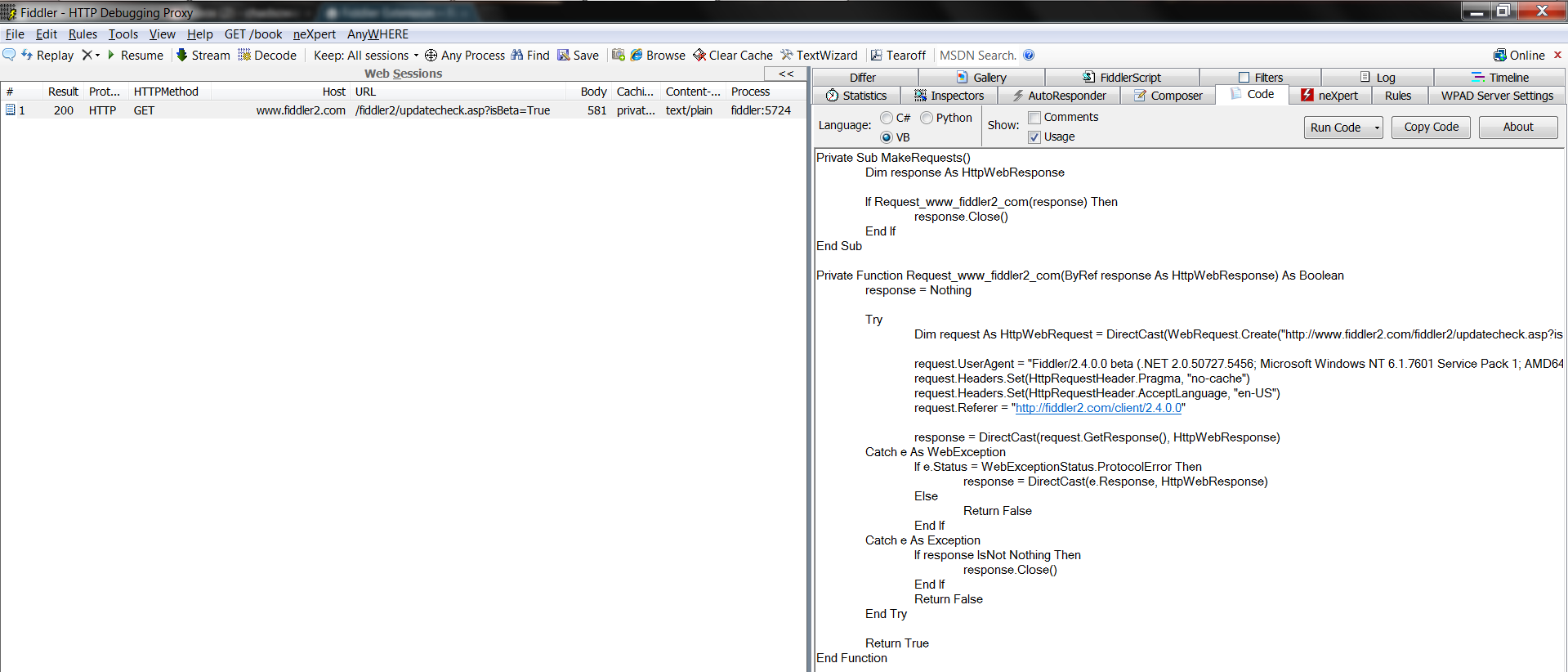
-

- Python

-

- Running Code
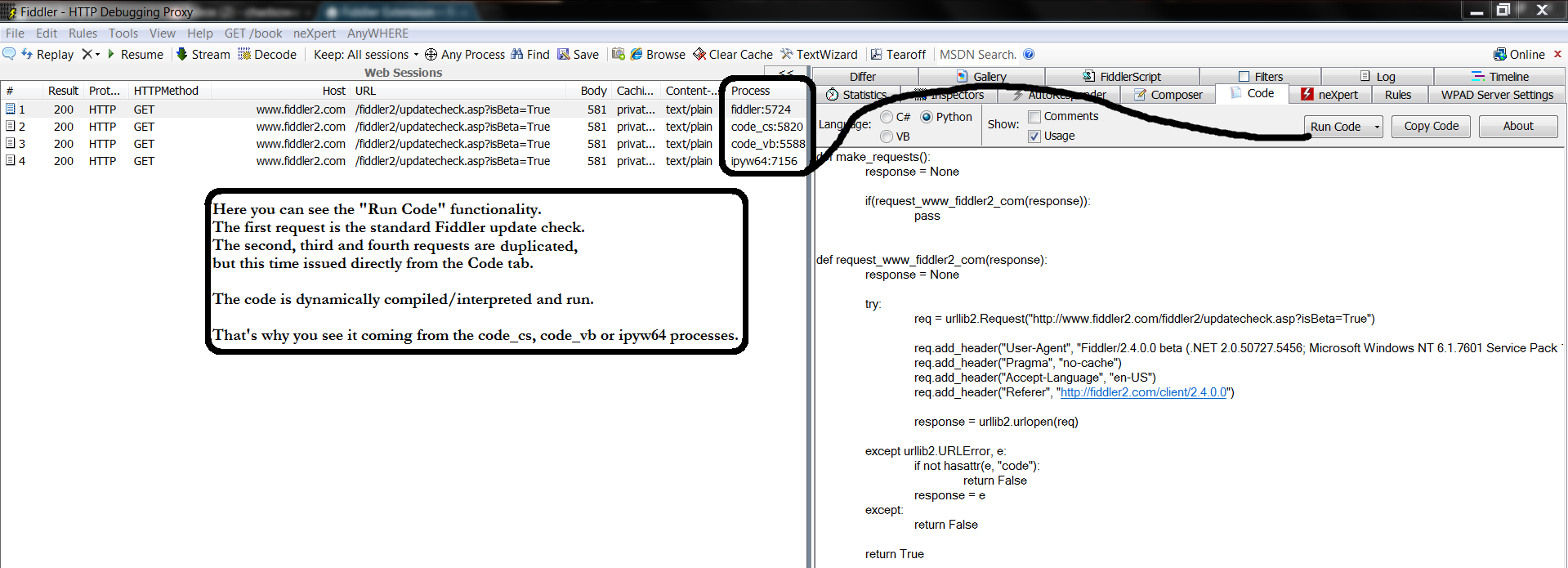
-

- Simple POST
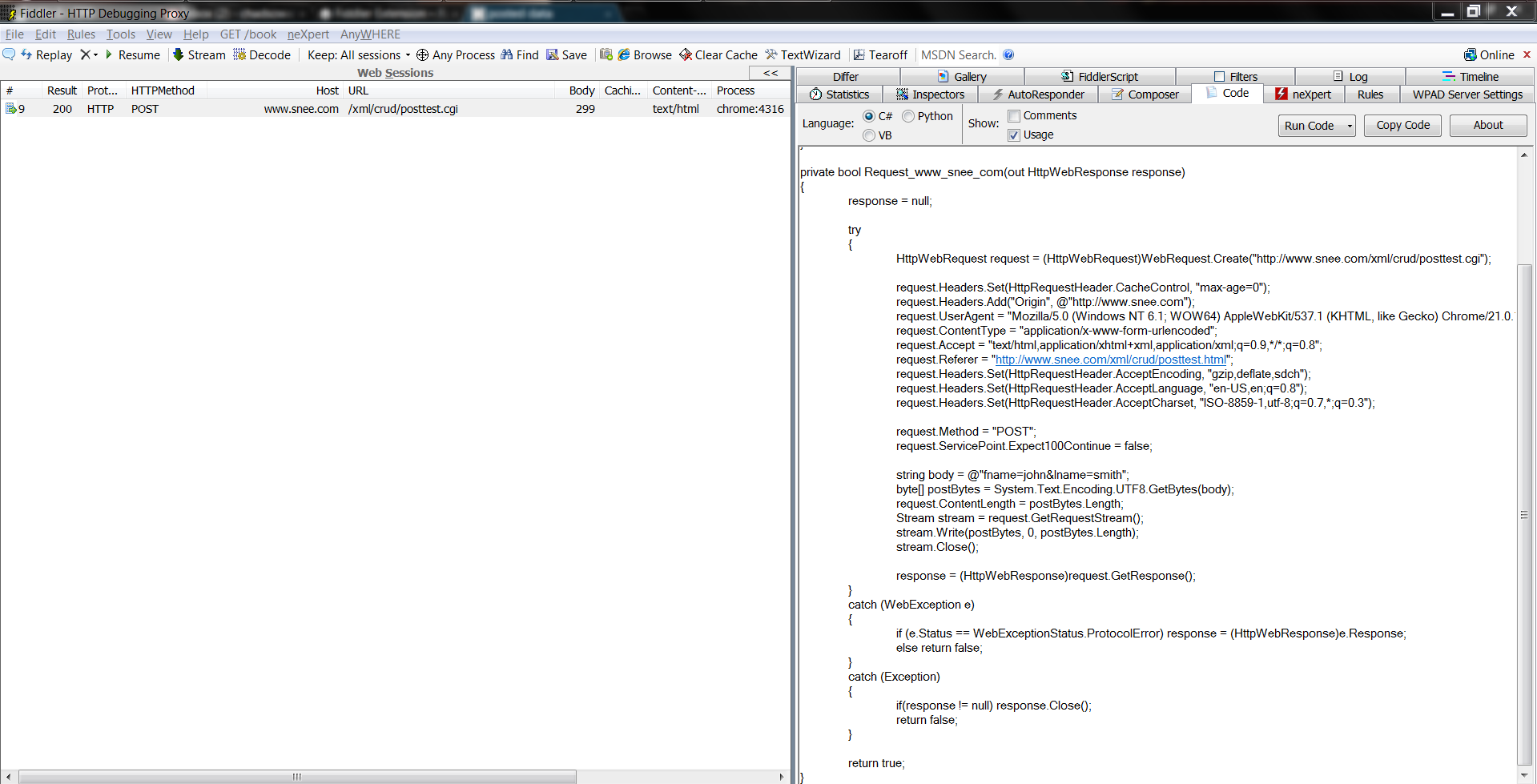
-
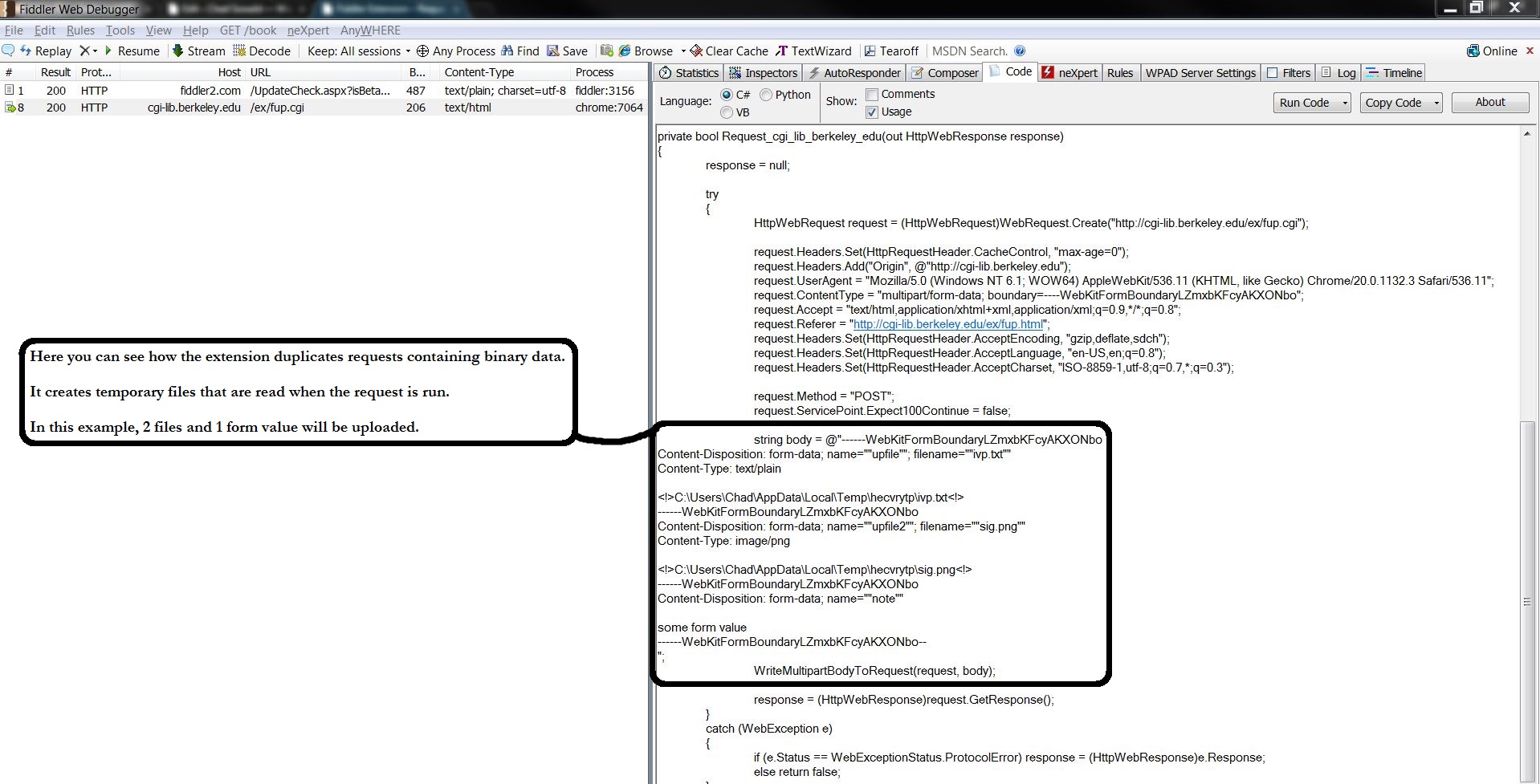
- Binary Data POST
Download “Fiddler Extension - Request To Code”
FiddlerRequestToCode2.2.2.0.zip – Downloaded 74892 times – 76 KBThis can be useful for a number of purposes:
- Submit form data programmatically – fill out a form online once with Fiddler running, then use the extension to copy and paste the request code into your own program. Â You could then make this request as many times and as often as you need to.
- Easily codify web requests – request resources like RSS feeds, images, XML, etc… from your program. Â Further modify the web requests to your needs.
- Programmatically test differing header values – you can easily modify the request functions so that you can try varying values for various HTTP headers. Â This way you can test your web site or web service against these various headers.
- Run code directly from the Code tab – you can use the “Run Code” button to run the code currently in the Code tab.
- Automatically generate code in conjunction with FiddlerCore – Reference both FiddlerCore and FiddlerCoreRequestToCode in your project and you can generate code and do whatever you want to do with it. For instance, you could write a file for each session you observe that contains the Request To Code code in it. See an example and learn more…
To Install:
- Copy FiddlerRequestToCode.dll from the .zip file into your Fiddler2\Scripts folder.
- You’ll need to restart Fiddler if it’s already running.
Read the Changelog.
Awesome…what a time saver!! Thank you so much 🙂
Thanks man, you saved my day
Can you please add Python 3 support? Perhaps generate some code that is compatible with Python 2 & 3 or add separate options to generate Python 2 or 3.
Thanks
Hi Jack. Thanks for the feedback. Currently, the extension tries to guess what version you have installed and will generate code for that version. There is no explicit version picker. However, you can change the Python executable path. If you point it at a Python 2.x EXE it will generate 2.x code and if you point it at a Python 3.x EXE it will generate 3.x code. Give it a try :-). It’s like this so that you can click the “Run Code” button and it will work. Thanks, ~Chad
Hi Chad, thank you very much for this tool.
it helped me alot.
saved me alot of time.
nice extension, thanks! keep working on it, buddy!
Hi Chad, thank you very much for this tool.
In the future, if you plan to extend the support to more languages, please consider PowerShell and cURL.
I agree – this would be a fantastic feature
Can you provide a HttpClient version besides current HttpWebRequest version? It’s fair common to use HttpClient since .Net 4.5 introduced async/await.
Hi deerchao. Thanks for your comment. I’m aware of the newer HttpClient, but have not yet decided to migrate to it for C#/VB code. I would prefer to expand to other languages first. This is on my radar though. Thanks.
That feature would be great indeed :D.
Exceuse me,Is the R2C can automatic update CookieContainer or Cookie? I think the cookie update is very urgent and useful for programmer. wating for you new version.
This is a really nice plugin, but I’d like the code to be more extensible, ex: use partial method to being able to extend generated code ex to parse each request before issuing and each request.
In pratical situation where I’m using generated code, I’m forced to modify generated code to modify stuff to inspect response from a specific request and extracting data to use in subsequent request (as I do with webperformanceTEst in VS).
Gian Maria.
Hi Gian. Thanks for your interest and suggestion. Did you happen to see the FiddlerCore version of this extension: http://www.chadsowald.com/software/fiddler-extension-request-to-code/fiddler-extension-request-to-code-fiddlercore? It’s the closest you’ll get right now, but might be enough for your purposes. Otherwise, I would need to add some extension points as you suggest. Let me know if this helps. Thanks, ~Chad
Thanks a lot for writing this, it came in really useful! The C# could do without ugly method names, exception handling, and out parameters. Also it doesn’t seem to respect the order of the attributes, it would be nice if it mirrored the raw request exactly. Why not make a version which generates one fire-and-forget request using TCP sockets? Very best regards
Hi and thanks for this extension
can you upgrade this extension to generate php code to duplicate a web request?
I’m not developer and cant upgrade this but i need for it
please upgrade it
thank you
Hi Hadi. Thanks for the suggestion to add PHP. I think that’s reasonable. I’ll add it to the feature list, though it will take some time to get it released. Thanks, ~Chad
Thanks for writing this.
It would be really useful if this extension parsed application/x-www-form-urlencoded POST bodies and generated a dictionary instead of injecting the body as a string.
I’d contribute the change myself if this was open source.
Hi and thanks for the suggestion. I’ll take a look into making the change and thanks for offering to do take care of it yourself, if the source was open. Thanks, ~Chad
I’ve been using Fiddler with this Request-to-Code extension for several years now–such an incredible time-saver. Thank you SO very much!
Pingback: Techdays 2015 – Jour 2 – Nos impressions | OCTO talks !
How can i get import/reference Newtonsoft.Json (C#) ?
I am trying to run JObject.parse(response) and i get the following error message, please help!
Error: Could not compile source code
The name JObject does not exist in the current context
Predefined type ‘Microsoft.CSharp.RuntimeBinder.Binder’ is not defined or imported
One or more types required to compile a dynamic expression cannot be found.
Are you missing a reference?
Hi. Click the arrow on the “Run Code” button and choose “Preferences”. In there, on the left you can add a reference to your DLL and then on the right add your “using” statement (minus the using). Let me know if you have any issues. Thanks, ~Chad
First of all great work on this tool…
Second I’m not being able to port the code to Windows Phone 8.1 Universal App
As it uses Windows.Web.Http reference
Any ideas?
Hi Pedro, thanks for your feedback. I don’t have any immediate suggestions. I’ll need to take a look and see if there’s any way to modify the code so it will work for your Windows Phone App. Let me know if you have any working samples and I can try to incorporate them. Thanks, ~Chad
Hi Chad,
Many thanks for providing this excellent plugin! Was bashing my head against the wall trying to reproduce a sophisticated POST request. Then stumbled on your amazing job and I’m saved! Thank you.
You have saved a lot of time for me. Worked like a charm. Would love to donate for your effort. Cheers, Ravee
This is a really handy extension. Too bad I discovered it AFTER writing a series of requests in C# first! I’ll be sure to use this often in the future. Thank you very much for putting it together.
Any chance of adding in Javascript/jQuery? Seems Microsoft is pushing us all there at the moment.
Hi Trev. Thanks for the suggestion. I assume – so correct me if I’m not following – but you mean you’d like to see JS (possibly using jQuery) that would make an equivalent AJAX call?
I am interested in capturing the tunnel requests ? How can I do that ???
What are you hoping to accomplish by getting code for the CONNECT tunnels?
By design, the extension does not generate code to duplicate the CONNECT tunnels. This is because all of the generated code automatically will tunnel/CONNECT as needed. For instance, the HttpWebRequest that’s used in the .NET languages automatically does a CONNECT when you use it to go to a HTTPS URL. Thanks, ~Chad
Fantastic work! Your extension has been a huge time-saver for me. Thanks!!! About the only thing I find I must modify to make a lot of the generated scripts (C#) work is defining a global CookieContainer variable and assigning it to the CookieContainer of every request so that all cookies are martialled correctly.
Hi Ryan. You’re not alone! Others have also asked for cookie handling. I plan to add something and what you’re doing sounds about right. Thanks! ~Chad
Chad,
Your product rocks and has helped solve several issues.
Thank You very much for your time and effort.
I have a suggestion, would it be possible for you to allow the generation of code compatible to drop into linqpad. I can do that now, by stripping off the parts that are not needed, but it would be nice to have a cut and paste option. Just being lazy 🙂
– Bob
Hello Chad! I just wanted to take the time to say thank you for this awesome extension! Being somewhat new to coding, I was beginning to become very frustrated with HTTP related development. Whether it involved the headers, postData or cookies, I always seemed to get bad responses. Thanks to your extension, however, I have had something to reference within my programming language, and it has enabled me to build a steady understanding of it all. So again, thank you for taking the time write this nifty plugin, and I give you a nod for releasing it for free. Thanks again!
Thanks so much for the kind words. I’m happy to hear it has helped you get a better grasp on HTTP! I know I gained a lot of understanding developing the extension and handling a lot of the corner cases. HTTP is very important to understand, regardless of whatever other languages you develop with. Cheers! ~Chad
Hi , Chad . Its amazing 🙂
Lifesaver.
Hi Chad,
This is very cool indeed!
1 small bug: method names are truncated Generatecode becomes …._nerateForm, ….._receive becomes …._eceive , ….._downloadzip becomes …..oadzip.
1 suggestion: is it possible to handle cookies better? Maybe check if cookes are returned, add them to a collection and send the dynamic values on subsequent requests, instead of hardcoding them in the header?
Hi Dimm. Thanks for mentioning the function name generation. I can reproduce what you’re saying, but this is actually by design so that function names do not get too long. If necessary, the function name generation trims the “filename” portion of the URL to the *final* 10 characters. This is so that you can see the file extension. There might be more graceful ways to handle it besides just increasing the limit or showing just the first 10 characters, so I’m open to suggestions.
Also, thanks for your suggestion about preserving cookies between subsequent requests based on the previous response. I’ve had a number of requests to improve cookie handling, so I may look into this. It’s just a matter of how much it would complicate the generated code as well as how this would be enabled or disabled in the UI, as space is at a premium. Again, suggestions are welcome.
Thanks,
~Chad
Hello!
Firstly I would like to thank you for the great extension!
It works great, even the multipart-b req are working fine.
But in my opionion it would be cool if u could add option to automatically decode the response body. I mean :
using (var httpWebResponse = imgrequest.GetResponse() as HttpWebResponse)
{
Stream stream = null;
using (stream = httpWebResponse.GetResponseStream())
{
if (httpWebResponse.ContentEncoding.ToLower().Contains(“gzip”))
stream = new GZipStream(stream, CompressionMode.Decompress);
else if (httpWebResponse.ContentEncoding.ToLower().Contains(“deflate”))
stream = new DeflateStream(stream, CompressionMode.Decompress);
var streamReader = new StreamReader(stream, Encoding.UTF8);
strResponse = streamReader.ReadToEnd() ;
}
}
What do you think about it ?
Regards,
Piotr
Hi Piotr. Thanks for the good idea. I will look into this and likely add it in the next release. It would probably be another optional check like the “Comments” and “Usage” so that it doesn’t always bulk up the generated code. Thanks for your suggestion!
Hi Piotr. Request to Code version 2.2.0.0 has just been released and adds support for response reading. Thank you again for your suggestion. ~Chad
Nice plugin. Could be very useful, but I have one slight problem with it. When the request contains headers with quotes the resulting c# code is invalid. Example:
request.Headers.Set(HttpRequestHeader.Authorization, “Digest realm=”Digest Authentication”, nonce=”nonce”, opaque=”opaque”, stale=”false”, algorithm=”MD5″, qop=”auth”, response=”51666f8aaef4d9eb290d441cf00b156c”, uri=”http://localhost.fiddler:63990/1/api/calls/4d148495-1310-4b89-b2c8-4d0c6cc90073/entries”, username=”ivar””);
Thanks! While most all headers were properly being set and escaped if needed, the HTTP Authorization header was not. This will be fixed in an upcoming release that you can expect within the next week.
That would be great. Thanks!
Hi Ivar,
Version 2.1.1.0 is out and addresses the header value quoting bug as well as a few other minor bugs. Thanks!
Is it possible to contribute to the plugin i.e. is it open source ?
Hi. Sorry, the plugin is not currently open source and I don’t have plans to make it so. Is there a particular language and/or feature you wanted to add? Thanks!
Well, I also thought I could add JS code generation (node.js). That would have been nice.
Thanks for the suggestion Ege!
Chad,
Kudos to you, my friend. This is one of the coolest, most useful contributions I have ever found. Thank you very much.
I really wonder how I missed this awesome plugin for two years. Thanks and hugs.
Excellent work!
just what i have been looking for a long time.
Thank you very much! Excellent extension.
Pingback: Creating a WebClient Request from an HTTP payload – d-fens GmbH
Hi Chad,
Your extension is fabulous!!!!
I wandted to know if there is a way to capture the response from a website that recevies the following response headers:
Content-Type: application/octet-stream
Content-Disposition: attachment; filename=000401013211.txt
Typically, what I want to know is that can the file that is being sent to the browse, can that be read. I have been trying for a few days now, but have not been able to save a file that is being sent.
Any help will be greatly appreciated.
Jay
Hi Jay. Sorry, I don’t understand what you’re asking to do. Can you clarify?
The extension only generates the request, not response. You can then use the “Run” button to issue those requests and see the responses in Fiddler. You could add onto the generated code to inspect the responses Or, you can take the code generated and use it in any .NET application and then inspect the returned responses there.
Very nice Chad. I once spent many hours using network monitor so I could decode pages and hand craft code to navigate around my bank’s internet banking site. Then they re-implemented it and all that was worthless. Even worse they keep ‘improving’ it so the HTML keeps changing. If only they would implement some service interfaces! They do for their mobile app/site but it has limited functions.
Between fiddler and your fiddler request to code extension, this sort of spelunking is much easier. A very heartful thank you.
A couple of requests:
o Fiddler 4 support
o Break out the cookies into a CookieContainer
o Break out QueryString into a name value collection (should be able to leverage the cookie parsing code to parse query string as well).
Thanks,
-mark
Hey Chad,
Someone asked about releasing the source. I would like to see that happen. I would take your code and replace the C# codegen with codegen for some other language (like say Objective -C or Java). What you have done is nearly perfect.. just looking to save myself a little more time when I need something like this..
DevTheo
Hi Chad,
I’ve installed the Fiddler4 beta (based on .net v4 I guess).
After simply copying the FiddlerRequestToCode.dll to …\Fiddler4\Scripts folder as described the Code tab still doesn’t appear. A problem with .net v4?
Hi Chad, thanks for the extension, it’s simply awesome. My question is if you have any plan to release the source code? Thanks in advance
Hi Albert. Thanks for the kind words! Sorry, I don’t plan on releasing the source code, at this time. Can I ask what you’re hoping to do with it? I might be able to help you out, anyways.
Thanks Chad that is very cool. It may be worth mentioning that for POST request, it appears to only work for string data ( e.g. non-string data serialized to the request stream does not work correctly ). Albeit probably an uncommon use-case, it might be nice to include the raw post bytes in the code snippet. Either way, echoing others, genius extension 🙂
Hi Dan – v2.0.0.0 of Request To Code now supports duplicating requests that POST binary data! Thanks for your report.
Thanks Chad for this great add-on. it works perfect. I’m just wondering to create a loop and delay in the code. Like for example when I drag the session to code box I get the code. now I add a loop to it and when I run it it’s fine and doesn’t get back any error but it just requests it once. even I have added loop to run it for example 4 times. I found how to add delay on running the code. I just need help to add loop to it. Thank you very much in advance.
Hi Mohammad. I can’t reproduce your problem. In fact, I can easily add loops such as:
private void MakeRequests()
{
   HttpWebResponse response;

   for(int i=0; i<4; i++)
   {
      if (Request_www_fiddler2_com(out response))
      {
         response.Close();
      }
   }
}
When I run this (along with the generated "Request_www_fiddler2_com" function), I see 4 requests in the Fiddler window, just like I would expect. Can you please post the code you're trying to run, so I can further help? Thanks.
Hi Chad,
I just downloaded Fiddler Request To Code 1.7.1 and noticed a couple of issues when clicking the Run (beta) button when the language is C#.
First, I receive an compilation error indicating that the source code could not be compiled because the type or namespace ‘Stream’ could not be found.
Second, if I add the statement
using System.IO;to the top of the code window, I receive a compilation error indicating that there is an invalid token ‘using’ in class, struct, or interface member declaration.Third, when the code is created, if the request being converted contains a SOAPAction in the request header, when the code is created for the line below, it creates two double-quotes around the method name in that line, as follows:
request.Headers.Add("SOAPAction", ""methodName"");. It should only have one double-quote before and after the method name value.Finally, if the request being converted contains a value of “Expect: 100-continue” in the request header, the code creates the following line, which causes an exception because the .NET Framework rejects values containing the string “100-continue” for the property being set:
request.Expect = "100-continue";Other than these issues, the extension works nicely from what I’ve seen so far. Also, I’d be happy to fix these issues and test the modifications if you’d like to send me the source code.
Keep up the good work!
Hi Michael. Thanks for the bug reports. Request To Code 1.8.0 has been published and it addresses/fixes all of the issues you mentioned.
You can read the Changelog for more information.
Awesome Job Chad, Keep it up! It works!
Hi Chad, this is a wonderful and very useful plugin. But i have character problems on ajax post request. Dou have any exprience about this issuse?
Hi ümit! You’ll have to provide more information about the characters that you’re having trouble with. Can you post a sample here, or provide a link where I can try this myself? Thanks for the kinds words and I’m glad you like the extension. Thanks, ~Chad
Thank you, works perfectly.
Hi Chad,
I love this extension for fiddler, I don’t suppose I could request a feature where you can execute the code request from within fiddler itself?
Cheers,
Lewis
Lewis – thanks for your comment and question! I’ve added dynamic compilation in version 1.7.0 as you can read in the changelog.
Also, have you considered just using Fiddler’s “Request Builder” if you just need to make one-off requests and change the headers/body of the request?
Will Fiddler work when testing what values are being sent to a Learning Management System (LMS) outside of our company. The hdnCompletionStatus is set to Failed until they reach the passing score of 70% in which it changes to Passed. On the LMS side once it reaches the passing score of 70% the Listerner page stops. The LMS company used the Fiddler to check what data was coming back from the CBTs which they noted is 70% even though the actual score could be 80, 90 or 100%. The same CBTs works in the UAT environment documenting the correct score that was achieved.
Questions is will Fiddle let me know what we are actually passing to the LMS which seems to be different than what the LMS is receiving or processing once they receive it. I don’t know much about a Listening page but if its stops working after it indicated that they reached the minimum passing score, how would it catch the actual end results of the missed questions.
Any help you can provide will be greatly appreciated…the CBTs in questions were built using Captivate 4.
Thanks Cathy
Hi Cathy,
This question would be better answered on the official Fiddler forums: http://groups.google.com/group/httpfiddler. This page is just about an extension I built for Fiddler.
In general, it sounds like you want to look at the web traffic. If your web pages use HTTP to send information to the LMS, you should be able to watch it with Fiddler and see the values being sent. Just give it a try or check out the Fiddler help pages to get a better idea of how to use Fiddler: http://fiddler2.com/Fiddler/help/
Thanks and good luck,
~Chad
@Salabim – Forgot to mention that you’ll need to call the MakeRequests() function that is generated to actually have it call of generated request methods.
1) Drag and Drop your sessions into the “Code” view.
2) Ensure the “Usage” option is checked.
3) Copy all of the generated code into your Visual Studio project.
4) In your code in VS, call MakeRequests()
@Steve – I think you may be mistaken. Are you able to provide a URL to test against? In my tests the request.ContentLength is being set to the proper value if there was a POST request. The extension merely copies most of the header values that I get from Fiddler. That’s why the extension writes request.ContentLength = 508; (for example) rather than always just writing request.ContentLength = postBytes.Length;. The only problem this should cause is if you want to change the request body. In that case, you would have to update the ContentLength. I’ll make the change so that it’s always set to postBytes.Length. Again, it would be great if you could also give more detail on the case you’re talking about. Thanks.
@Salabim – The usage box generates a function that calls all of the request functions that were generated and gives you a good idea of how to use the functions. That usage box is the quickest way. You’ll want to have that option on, then copy all of the code into your Visual Studio project. If all you want is for the requests to be reissued from your code, that’s all you should need to do. If you want to actually examine the responses, you’ll need to add additional code. Hope that helps. I’ll try to add this information to the extension page so others will know. Thanks.
Thank you *very* much for this fantastic add-on, it’s great !
Just two tiny Q’s
1) What’s the purpose of the “Usage” tickbox.
2) How can we easily use your code afterwards to autorun the code/requests ?
Great little tool, saved me a bit of typing at least!
I did see one problem, the “request.ContentLength” value was not set to the correct value. I changed the code to “request.ContentLength = postBytes.Length” and it worked fine.
Great job Chad! I love it!
Absolutly great. Love It!
I’m a lucky guy to have found your program today. It saved me hours of work!
T H A N K Y O U!
Glad to hear it!
very cool. Thanks for doing this.